
The previous part of this series examined how Microsoft Entra Private Access can replace broad, network-centric VPN connectivity with access to defined applications and resources.
That conversation often begins with Windows, but a modern access architecture cannot stop there.
Many organisations now have a significant macOS estate. Developers, architects, executives, creative teams and technical specialists may use a Mac as their primary device. They still need access to internal applications, administrative services, Microsoft 365 and internet resources, but deploying a traditional VPN to those devices simply recreates the same network-centric model on another operating system.
Microsoft Global Secure Access provides a dedicated client for macOS. It can acquire traffic for Microsoft Entra Private Access, Microsoft Entra Internet Access and the Microsoft traffic profile, sending only the traffic selected by the organisation through Microsoft’s Security Service Edge.
This means a managed Mac can participate in the same identity-driven access architecture as a Windows device without being treated as an exception or being given unrestricted connectivity to the corporate network.
The Mac does not need to become a member of every network where its applications happen to live. It needs a controlled route to the resources that its user is authorised to access.
Why macOS belongs in the VPN replacement conversation
macOS support is sometimes considered after the main remote-access design has already been completed.
The result is often one of two compromises:
- Mac users retain a legacy VPN while Windows users move to a newer access model.
- The organisation reproduces the same broad VPN routes across both platforms.
Neither approach creates a consistent Zero Trust architecture.
If the objective is to move from network access to application access, that principle should apply regardless of whether the endpoint runs Windows or macOS.
The better design question is not:
How do we give a Mac the same internal network routes as a Windows laptop?
It is:
Which applications does this user need, from which managed device, and under what identity and security conditions?
Microsoft Global Secure Access makes that a realistic question for the Mac estate.
A dedicated Global Secure Access client
macOS uses a dedicated Global Secure Access client. This is different from the mobile implementation on iPhone, iPad and Android, where the capability is delivered through the Microsoft Defender application.
The macOS client uses Apple system extensions and a transparent application proxy to acquire traffic. Forwarding profiles delivered by Global Secure Access determine which connections are sent to Microsoft’s service. Traffic that does not match an enabled profile continues along its normal network path.
Microsoft currently supports the client on macOS 14 or later across supported Intel and Apple silicon processors. The device must be registered with Microsoft Entra through Company Portal and enrolled through a mobile device management solution. Microsoft documents the current requirements in Install the Global Secure Access client for macOS.
This is an important distinction from a traditional full-tunnel VPN. Installing the client does not automatically mean that every connection from the Mac is sent through Global Secure Access.
The organisation decides which traffic profiles to enable, which users and groups receive them, and which private applications those identities are assigned to.
How the traffic path works
The high-level path begins on the Mac but changes according to the type of destination.
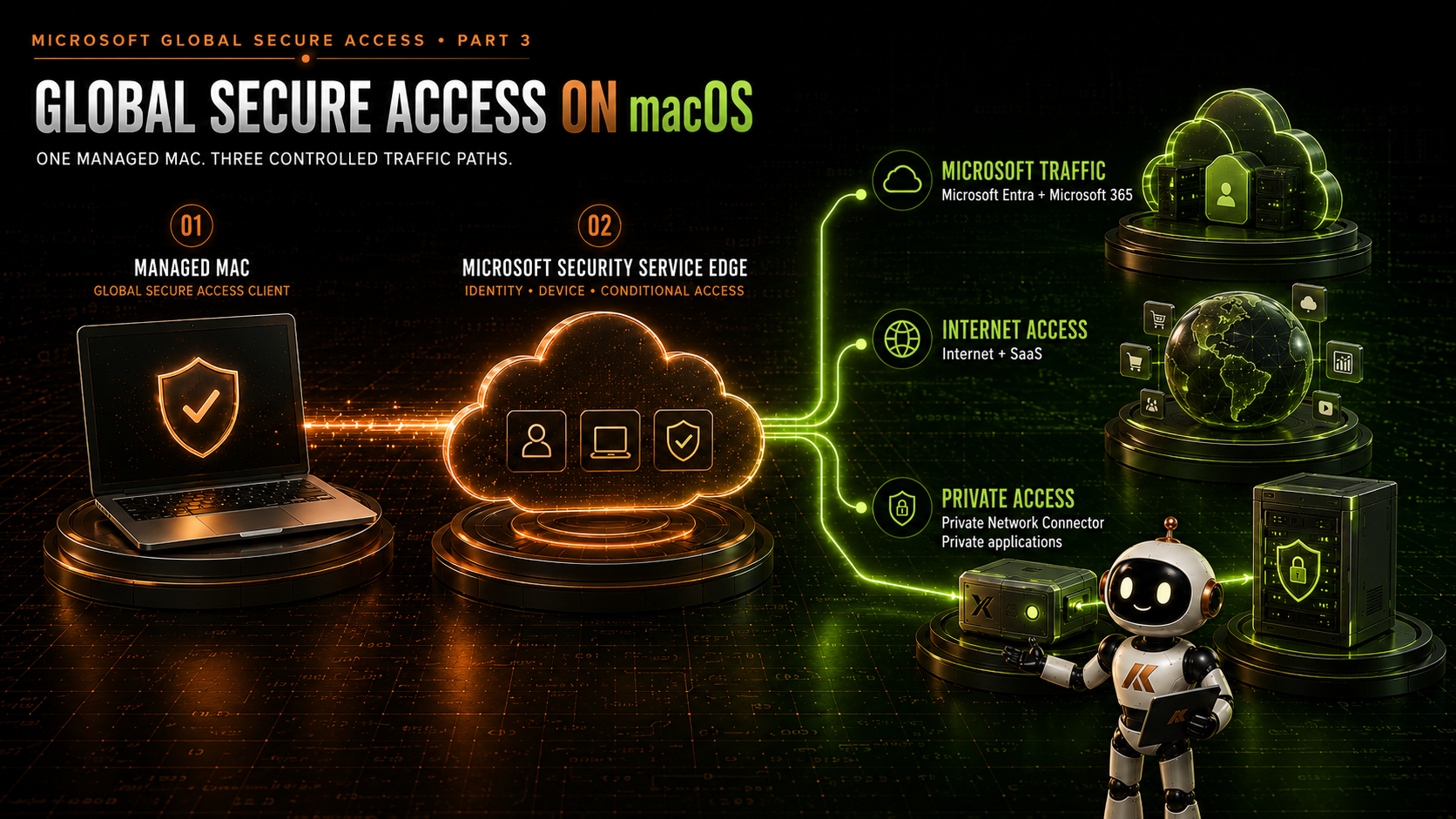
At a high level:
- The user opens an application, browser or remote-access tool on the Mac.
- The Global Secure Access client evaluates the connection against the forwarding profiles assigned to that user.
- Matching traffic is sent to Microsoft’s Security Service Edge.
- Microsoft Entra applies the relevant identity, device and access controls.
- Microsoft and internet traffic exits through the appropriate Global Secure Access service path.
- Private Access traffic is sent through an available private network connector to the internal resource.
The Mac does not receive a conventional address on the private network. The connector establishes the connection from a network that can reach the destination, while the client and Microsoft Entra control which identity can use the route.
Microsoft’s Global Secure Access client overview describes how traffic forwarding profiles allow the client to route selected traffic through Microsoft Entra Internet Access and Microsoft Entra Private Access.
What Global Secure Access can provide on a Mac
A managed macOS device can currently use all four Global Secure Access tunnels:
| Traffic path | Purpose on macOS |
|---|---|
| Microsoft Entra traffic | Applies supported controls to authentication and Microsoft Entra destinations. |
| Microsoft 365 traffic | Acquires supported Microsoft 365 traffic through the Microsoft traffic profile. |
| Internet Access | Applies identity-aware Secure Web Gateway controls to internet and SaaS traffic. |
| Private Access | Connects the Mac to assigned private applications through private network connectors. |
Microsoft confirms the available platform behaviour in Bring Your Own Device with Global Secure Access.
These paths can be adopted independently. An organisation might initially deploy only Private Access to replace an existing VPN, then introduce Microsoft and Internet Access capabilities in later phases.
The client provides the common foundation, but each traffic profile has a different purpose and security boundary.
Private Access from macOS
Microsoft Entra Private Access is likely to be the most immediate use case for organisations replacing remote-access VPNs.
The Mac can reach defined internal resources through Quick Access or individual Global Secure Access applications. Destinations can be represented using fully qualified domain names, IP addresses, ports and protocols.
Potential macOS use cases include:
- Internal web applications
- Administrative web portals
- SSH access to a defined Linux server or management endpoint
- Remote Desktop access to a workstation or server
- SMB file services
- Private APIs and development platforms
- Database and line-of-business application endpoints
- Management services hosted in Azure or a datacentre
The destination does not need to support Microsoft Entra single sign-on for Private Access to provide value. Private Access supplies the controlled network path. The destination can continue to use its existing authentication method.
That separation is important:
- Microsoft Entra controls who can reach the application route.
- The destination application controls what the user can do after connecting.
Private Access does not replace the authentication, authorisation or security controls of the application itself.
Application access rather than network membership
Consider a developer who needs access to:
- An internal source-code or package service
- A Linux administration host over SSH
- A private test application
- An internal documentation platform
A traditional VPN might provide routes to several private subnets so that all four services work.
Microsoft Entra Private Access allows those requirements to be represented as specific applications and connections. The developer can receive the destinations and ports required for their role without receiving a general route to every resource in those networks.
The same principle applies to an administrator who uses a Mac to reach a controlled remote management environment. The Mac may need access to a published PAW or management host, but it does not necessarily need direct connectivity to every domain controller, hypervisor and certificate authority.
This reduces the discovery surface available from the endpoint and creates a clearer relationship between the identity and the resource.
| Area | Traditional VPN on macOS | Microsoft Entra Private Access on macOS |
|---|---|---|
| Access boundary | Network, route or subnet | Defined application or resource |
| Traffic selection | Full tunnel or split-tunnel routes | FQDN, IP, port and protocol |
| Private entry point | Internet-facing VPN gateway | Outbound private network connectors |
| Primary assignment | VPN profile and gateway policy | Microsoft Entra users, groups and enterprise applications |
| Device placement | Commonly treated as present on the internal network | No direct membership of the private network |
| Conditional Access | Usually applied at VPN authentication | Applied to Quick Access and individual Private Access applications |
| User experience | Connect to a network | Open an assigned application through the running client |
The user may experience both as remote connectivity, but the security boundary is fundamentally different.
Quick Access and published applications still matter
The choice between Quick Access and individual Private Access applications is not specific to macOS, but the endpoint platform does not remove the need to make that architectural decision.
Quick Access can help an organisation begin a migration by publishing several related destinations or a carefully restricted collection of existing VPN routes. Application Discovery can then show which destinations users actually reach through Quick Access.
Once the application dependencies are understood, individual Global Secure Access applications provide a more explicit boundary. Each application can have its own destinations, assignments, connector group and Conditional Access protection.
A sensible macOS migration might therefore progress from:
- A restricted Quick Access pilot for selected Mac users.
- Observation of the private resources those users actually consume.
- Creation of individual applications for stable and sensitive workloads.
- More precise group assignments and Conditional Access policies.
- Removal of the equivalent routes from the legacy Mac VPN profile.
The goal is not to rebuild the entire internal network inside Quick Access. It is to use Quick Access as a bridge towards application-level access.
Microsoft explains the transition in Application Discovery for Global Secure Access.
Microsoft Entra Internet Access on macOS
Private Access answers the question of how the Mac reaches internal resources. Microsoft Entra Internet Access addresses a different requirement: how internet and SaaS traffic is protected when the Mac is away from a corporate network.
Depending on the licences and features configured by the organisation, Internet Access can provide capabilities such as:
- Identity-aware web filtering
- Web-category and destination controls
- Consistent internet policy across office, home and public networks
- Visibility into internet and SaaS usage
- Universal Tenant Restrictions
- Protection against access to unauthorised tenants or personal accounts
- TLS inspection where it is appropriately designed and supported
This allows the internet policy to follow the user and device rather than relying entirely on a branch firewall or the user’s current source IP address.
It also means that a Mac can use the same overall Secure Service Edge strategy as the Windows estate. The policy may differ by group, risk or device type, but the architecture does not need a completely separate web-security product simply because the endpoint is running macOS.
Internet Access should still be introduced deliberately. Web filtering, TLS inspection, certificate trust, application compatibility and privacy requirements all need to be assessed before broad rollout.
Microsoft traffic on macOS
The Microsoft traffic profile acquires supported Microsoft Entra and Microsoft 365 traffic through Global Secure Access.
This can help extend controls such as:
- Identity-aware access to Microsoft services
- Universal Tenant Restrictions
- Compliant network checks for supported Microsoft Entra-integrated applications
- Improved traffic visibility
- Consistent policy away from corporate locations
The value is not simply a different route to Microsoft 365. It is the ability to bring identity, device and network policy together when users access Microsoft services from a managed Mac.
An organisation does not need to enable every Global Secure Access workload at the same time. Private Access, Microsoft traffic and Internet Access should be treated as related but separable design decisions.
The managed Mac is the foundation
Global Secure Access on macOS is built around a managed-device model.
At the time of writing, Microsoft requires a Mac to be enrolled through a mobile device management solution. Unenrolled macOS BYOD is not supported for the Global Secure Access client.
This is different from some Windows and mobile scenarios where Microsoft Entra registration without full device enrolment can provide a limited access path.
For macOS, the managed foundation normally includes:
- MDM enrolment, commonly through Microsoft Intune
- Microsoft Entra registration through Company Portal
- Deployment of the Global Secure Access
.pkg - Approval of the required system extensions
- Approval of the transparent application proxy
- Deployment of the Microsoft Enterprise SSO plug-in
- Compliance policy where sensitive applications require a compliant device
- Controlled client updates and lifecycle management
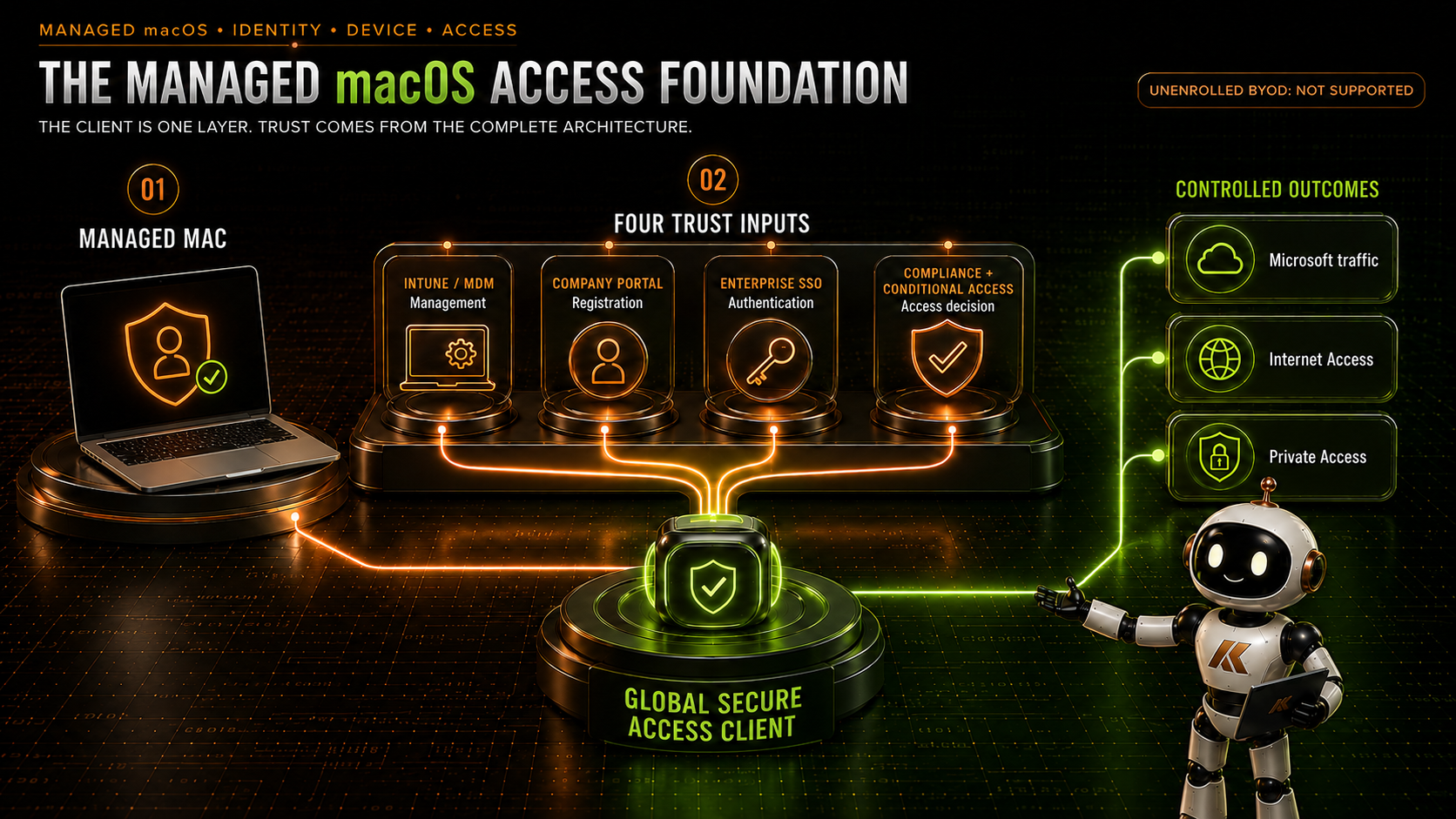
The client alone is not the complete solution. Device management, identity registration, SSO, compliance and traffic policy need to operate as one service.
Company Portal and Microsoft Entra registration
The Global Secure Access client needs an identity relationship between the Mac and the Microsoft Entra tenant.
Company Portal provides that relationship and is a prerequisite in Microsoft’s current macOS guidance. The Mac is registered with Microsoft Entra, and the Global Secure Access client connects to the tenant selected during its initial sign-in.
Device registration and device compliance should not be treated as interchangeable:
- Microsoft Entra registered means that the device has an identity relationship with the tenant.
- MDM enrolled means the device is managed and can receive policies, applications and configuration.
- Compliant means the device currently satisfies the organisation’s configured compliance rules.
A Mac can be registered and enrolled but still be noncompliant. If access to a sensitive private application requires a compliant device, Conditional Access must evaluate that state successfully.
The Microsoft Enterprise SSO plug-in
Microsoft recommends deploying the Microsoft Enterprise SSO plug-in for an SSO experience based on the account signed in through Company Portal.
The plug-in reduces repeated authentication prompts and provides brokered authentication to applications integrated with Microsoft Entra ID.
This is complementary to Global Secure Access:
- Global Secure Access controls and carries the relevant traffic.
- The Enterprise SSO plug-in improves authentication to Microsoft Entra-integrated applications.
The two solve different parts of the user journey.
Platform Single Sign-on can take the integration further. It can use a Secure Enclave-backed platform credential, smart card or password-based configuration to provide SSO from the Mac to Microsoft Entra ID. Microsoft also supports optional Kerberos SSO for users who still need on-premises Active Directory resources.
This creates an interesting broader architecture: a Mac can use modern Microsoft Entra authentication while Global Secure Access supplies controlled connectivity to Microsoft, internet and private resources.
Microsoft describes these identity capabilities in macOS Platform Single Sign-on overview.
Conditional Access protects the application boundary
Private Access applications and Quick Access are represented as enterprise applications in Microsoft Entra ID. Conditional Access can therefore be applied to those application objects.
Depending on the sensitivity of the destination, access from a Mac could require:
- Multifactor authentication
- A specific authentication strength
- A compliant device
- A supported macOS platform
- An acceptable user or sign-in risk
- Membership of an approved user or administrative group
The policy should follow the resource.
An internal information portal may have different requirements from an SSH management endpoint or a remote connection to a privileged workstation.
There is an important detail in Microsoft’s current implementation: Conditional Access is applied to the Quick Access or Global Secure Access application rather than directly to an individual network packet. The application assignment and Conditional Access decision protect the right to use the route.
The destination must still authenticate and authorise the connection. Allowing a user to reach TCP 22 on a Linux server does not grant them a valid SSH account, and allowing a route to an internal website does not bypass that application’s sign-in requirements.
At the time of writing, Universal Continuous Access Evaluation is supported only by the Windows Global Secure Access client. The macOS client uses regular access tokens, so revocation and reauthentication behaviour should be tested rather than assumed to match Windows exactly. Microsoft maintains the current position in Known limitations for Global Secure Access.
A secure route does not automatically make the Mac a PAW
Global Secure Access can give a Mac a controlled route to administrative infrastructure. That does not automatically make the Mac a Privileged Access Workstation.
A PAW is defined by the complete security and operational environment around privileged activity, including:
- Device ownership and management
- Administrative identity separation
- Application allow-listing and endpoint hardening
- Restricted productivity and internet use
- Strong, phishing-resistant authentication
- Monitoring and response controls
- A defined privileged operating model
If a general-purpose Mac is allowed to reach a PAW through Remote Desktop, the Mac is acting as the access device. The privileged tools and execution environment remain on the PAW.
If an organisation wants the Mac itself to be used as a privileged workstation, it must be designed and governed as one. Private Access protects the route but cannot supply all the trust properties of the endpoint.
This distinction will become increasingly important as organisations extend administrative access across different device platforms.
DNS remains part of the access architecture
Private Access commonly relies on FQDN-based application segments and private name resolution.
An internal application may depend on:
- A private DNS suffix
- Split-brain DNS
- CNAME records
- Authentication and API hostnames
- Service discovery records
- Multiple content or redirect destinations
Microsoft Entra Private DNS can forward matching internal queries through the relevant connector group. The connector then resolves the destination using the DNS configuration available in its network.
The Mac does not need direct access to the organisation’s internal DNS servers, but the complete name-resolution path still needs to be designed and tested.
Secure DNS requires specific attention
Microsoft currently identifies Secure DNS as a macOS limitation.
If Secure DNS is enabled in macOS or the browser and the DNS server supports it, the Global Secure Access client cannot acquire FQDN-based traffic as expected. IP-based traffic is unaffected because it does not depend on the client observing the DNS request.
This can create a confusing symptom: an application works when published by IP address but fails when represented by its FQDN.
The design must consider:
- Secure DNS configured in macOS
- Browser-managed DNS over HTTPS
- DNS settings delivered by MDM
- Existing DNS security products
- Proxy and Secure Web Gateway clients
- Whether IP-based rules are an acceptable fallback
Disabling a security capability should never be treated casually. The organisation should understand why the change is required, document the effect and review the limitation as the platform evolves.
Certificates still matter
Private Access can make an internal HTTPS application reachable, but it does not make an untrusted certificate valid.
Internal web services may use:
- Certificates issued by a private certification authority
- Self-signed appliance certificates
- Names that do not match the certificate subject
- Old or expired certificates
For a managed Mac, the required root and intermediate certificates can be delivered through MDM. Internal applications should use certificates containing the correct DNS names, and users should not be trained to bypass certificate warnings.
Certificate planning becomes even more important if Microsoft Entra Internet Access TLS inspection is introduced. The device must trust the certificate chain used by the inspection service, and applications that use certificate pinning or unusual TLS behaviour require validation.
Connectivity is only complete when the application is both reachable and trusted.
The user experience
A successful deployment should make the architecture almost invisible to the user.
The expected experience is:
- The user signs in to the managed Mac.
- The Global Secure Access client starts and connects to the assigned tenant.
- The user opens an application or website normally.
- Matching traffic is acquired automatically.
- Authentication is requested only when the relevant policy or application requires it.
The client menu provides visibility into its connection state and the available channels. It also provides actions such as pause, disable, restart, log collection and advanced diagnostics. Administrators can use MDM-delivered preferences to hide selected controls where users should not be able to bypass the service casually.
The objective is not to remove every support control. It is to decide deliberately which actions the user needs and which should remain under administrative control.
The Mac should feel as though the assigned application is simply available, not as though the user has joined a remote network.
Coexistence needs testing
Mac estates frequently already contain one or more network and security agents:
- A traditional VPN client
- A third-party Zero Trust Network Access client
- A Secure Web Gateway or proxy agent
- Endpoint detection and response software
- DNS filtering software
- A developer proxy or local traffic-inspection tool
The Global Secure Access client uses system extensions and a transparent application proxy, so coexistence cannot be assumed from product names alone.
Two products might both attempt to acquire, proxy or inspect the same connection. That can result in:
- Traffic loops
- Applications bypassing the intended service
- DNS resolution failures
- Duplicate TLS inspection
- Performance problems
- Unexpected authentication prompts
- Different behaviour on and away from the corporate network
Microsoft publishes coexistence guidance for several security vendors, but the organisation must test the exact combination of client versions, forwarding rules, proxy exceptions and device configuration it intends to run.
During a staged VPN migration, the ownership of each traffic path should be explicit. For example:
- The legacy VPN continues to carry an application that has not yet migrated.
- Private Access owns the published internal applications.
- Internet Access owns defined internet traffic.
- Explicit bypasses prevent the same flow from being acquired twice.
Coexistence should be a controlled transition state, not an indefinite collection of overlapping agents.
macOS limitations that matter
The macOS client provides broad capability, but it is not identical to the Windows client.
At the time of writing, the most relevant considerations include:
Unenrolled BYOD is not supported
The Mac must be enrolled through an MDM solution. Registration without device enrolment is not currently a supported macOS Global Secure Access scenario.
Secure DNS affects FQDN acquisition
When Secure DNS is active in the operating system or browser, FQDN-based traffic might not be acquired. IP-based rules are not affected in the same way.
QUIC is not supported for Internet Access
Internet Access does not currently tunnel QUIC traffic on UDP ports 80 and 443. Administrators can disable QUIC in browsers so that connections fall back to HTTPS over TCP. Microsoft currently documents QUIC support for Private Access and Microsoft 365 workloads.
UTM networking requires care
The client has specific behaviour with UTM virtual machines. With bridged networking, traffic from a guest without its own client bypasses the host’s Global Secure Access policy. Shared networking is not supported in the same way and can block virtual-machine traffic. Development teams that run local virtual machines need separate testing.
Universal CAE is Windows-only
The macOS client currently uses regular access tokens rather than the Universal Continuous Access Evaluation support available on Windows.
IPv6 is not tunnelled
The Global Secure Access client currently tunnels IPv4 traffic. IPv6 traffic continues directly to the network, which must be considered when an organisation expects all internet traffic to follow Global Secure Access policy.
Geolocation may change
An application receiving tunnelled traffic sees the Global Secure Access edge address rather than the original public address of the Mac. This can affect services that rely on source-IP geolocation.
Fallback behaviour is a design decision
If the client cannot reach the Global Secure Access service, the matching rule can fall back to a direct connection or block the connection according to the configured hardening behaviour. Sensitive applications should not inherit an accidental fail-open path.
Microsoft updates these behaviours as the platform evolves. Review Known limitations for Global Secure Access again before moving from pilot to production.
Common architecture mistakes
Treating macOS as an afterthought
Leaving Mac users on a legacy VPN creates two remote-access architectures and delays the move towards consistent identity-driven access.
Assuming the Windows design can be copied unchanged
The outcomes are similar, but the client architecture, MDM dependencies, SSO experience, DNS limitations and virtualisation behaviour differ.
Deploying the package without its configuration
The .pkg is only one component. The system extensions, transparent proxy, Company Portal registration, SSO plug-in, traffic assignments and Conditional Access policies must also align.
Treating registration as compliance
A registered Mac is not necessarily managed, healthy or compliant. Sensitive applications should use the appropriate Conditional Access controls.
Publishing entire private networks
Putting broad RFC1918 ranges into Quick Access might produce a successful test, but it recreates the VPN’s network-centric access boundary.
Ignoring DNS and certificates
An application segment can be correctly assigned while the application still fails because its name cannot be resolved or its certificate is not trusted.
Assuming every security agent will coexist
VPN, proxy, DNS and SSE products can compete for the same traffic. Coexistence must be engineered and validated.
Calling every administrative Mac a PAW
Access to a privileged resource does not give the endpoint the security properties of a Privileged Access Workstation.
Designing a sensible macOS access model
A practical design should begin with real user and application requirements.
For each macOS use case, record:
- The users and groups that need the access
- The device ownership and management state
- The required compliance level
- The application FQDNs or IP addresses
- The required ports and protocols
- The Private Access connector group
- DNS suffixes and secondary application dependencies
- Certificate trust requirements
- The destination’s own authentication method
- The relevant Conditional Access policy
- Existing VPN, proxy and security clients
- Expected behaviour on corporate and external networks
- Fallback behaviour during a service failure
- The support and recovery path
The Mac estate should also be segmented where the risk justifies it.
For example:
- General users receive selected internal web applications.
- Developers receive specific development, source and administration services.
- Support teams receive defined management endpoints.
- Privileged administrators reach a PAW or hardened management environment rather than receiving broad infrastructure routes.
The operating system does not determine the access boundary. The identity, device and application requirement should determine it.
Validating the macOS experience
This article is not a deployment guide, but validation is an essential part of understanding what the capability can deliver.
The macOS client includes an Advanced Diagnostics tool with a Health Check tab. It can validate areas such as the client services, system extension, transparent proxy, policy retrieval and channel connectivity. Microsoft documents the current checks in Troubleshoot the macOS Global Secure Access client.
A meaningful pilot should verify:
- The client installs and updates through the chosen MDM platform.
- The system extensions and transparent proxy are approved without unexpected user prompts.
- The Mac registers with the correct Microsoft Entra tenant.
- Company Portal and the Enterprise SSO plug-in provide the expected sign-in experience.
- Assigned users can reach the private application.
- Unassigned users cannot use the same route.
- Conditional Access blocks a noncompliant device where required.
- Internal FQDNs resolve correctly.
- Certificates are trusted.
- Application redirects and secondary hostnames work.
- Existing VPN, proxy and endpoint security agents coexist as designed.
- Internet Access policy behaves consistently across browsers and applications.
- The service works from office, home, public Wi-Fi and a mobile hotspot.
- Captive portal sign-in does not leave the client in an unexplained state.
- Sleep, wake and network changes do not break the expected experience.
- Connector resilience is tested for Private Access applications.
- Removing the user assignment removes access.
- Fail-open or fail-closed behaviour matches the sensitivity of the resource.
Testing only that an internal homepage opens is not enough. The complete user journey and the failure path both need to be understood.
Where Global Secure Access on macOS fits
Global Secure Access is a strong fit for macOS when:
- The organisation operates a managed Mac estate.
- Mac users need access to defined internal applications.
- The organisation wants to reduce or retire traditional VPN connectivity.
- Identity and device controls should apply across Windows and macOS.
- Internet policy must follow the user away from corporate locations.
- Microsoft 365 and Microsoft Entra traffic need consistent controls.
- Developers need scoped access to private tools and environments.
- Administrators need a controlled route to a remote management environment.
Another connectivity model may still be required when:
- The Mac cannot be enrolled through MDM.
- A required application depends on unsupported traffic or DNS behaviour.
- A conflicting security agent cannot be made to coexist safely.
- Local virtualisation requires a network mode that does not work with the client.
- The destination cannot be represented cleanly as an application or controlled Quick Access scope.
The objective is not to force every Mac connection through the service. It is to use Global Secure Access where it creates a clearer and more controllable relationship between the identity and the resource.
Final thoughts
Microsoft Global Secure Access on macOS is more significant than simply adding another supported operating system.
It allows organisations to extend the same architectural change beyond Windows:
- From network access to application access
- From location-based trust to identity and device context
- From inbound VPN infrastructure to outbound private network connectors
- From branch-only web controls to policy that follows the user
- From separate endpoint strategies to a more consistent Security Service Edge platform
The dedicated Mac client can carry Private Access, Internet Access and Microsoft traffic while Microsoft Entra provides the identity and policy layer.
The strongest design is not the one that makes a Mac behave as though it is connected to the entire corporate network. It is the one that gives the user access to the applications they need, from a managed device, under conditions that reflect the sensitivity of those applications.
That is the value of Global Secure Access on macOS.
It brings the Mac into the identity-driven access architecture rather than leaving it at the edge of it.
What’s next?
The macOS client demonstrates how Global Secure Access can extend the desktop access model beyond Windows. The next part of the series moves to phones and tablets, where Microsoft uses a different client and networking model.
In Part 4: Microsoft Global Secure Access on iPhone, iPad and Android, I will explore how the capability is delivered through Microsoft Defender and how mobile devices can securely reach private applications and infrastructure.
I will also share how I use my iPad to access Proxmox, internal web services and my internal Privileged Access Workstation without exposing those resources directly to the internet.
Further reading
- Install the Global Secure Access client for macOS
- Global Secure Access client overview
- Bring Your Own Device with Global Secure Access
- Learn about Microsoft Entra Private Access
- Application Discovery for Global Secure Access
- macOS Platform Single Sign-on overview
- Troubleshoot the macOS Global Secure Access client
- Global Secure Access client for macOS release notes
- Known limitations for Global Secure Access
Comments
No comments yet — be the first to leave one below.